





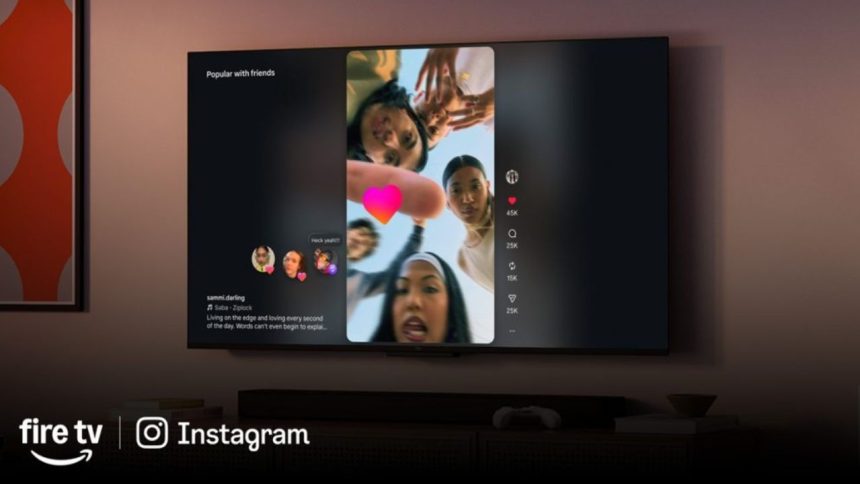
Meta is pushing Instagram beyond phones with Instagram for TV, a fresh app now testing on Amazon Fire TV devices in the US. This move brings short-form Reels to your living room, perfect for shared viewing sessions with family or friends.
What You Get with Instagram for TV
The app turns your TV into a Reels hub, grouping videos into fun, interest-based channels like music vibes, sports highlights, travel adventures, and trending clips. Videos autoplay with sound for effortless, hands-free bingeing—no more endless scrolling from the couch.

It supports up to five accounts per household, so everyone gets their personalized feed. You can even set up a dedicated TV-only profile. Install it straight from the Amazon Appstore on compatible devices like the Fire TV Stick 4K Max, Fire TV Stick HD, or Omni QLED Series, then log in with your existing Instagram credentials. Pro tip: Fire it up via a quick shortcut in the mobile app’s Settings.
Search, Future Upgrades, and Safety First
Dive into creators, Reels-focused profiles, or niche topics with built-in search tools. Instagram promises upcoming tweaks based on tester feedback, including:
- Phone-as-remote control
- Smarter channel browsing
- Group shared feeds
- Quick access to followed creators’ content
Safety stays front and center. Content sticks to PG-13 standards for family-friendly vibes, mirroring mobile app rules. Teen accounts carry over restrictions on iffy Reels, comments, and profiles, plus usage limits and sleep reminders—all tracked across devices.
Limited Rollout for Now
This early test is US-only on select Fire TV hardware. No word yet on wider availability or Android TV/smart TV support, but user input will shape what’s next.
Instagram for TV could redefine how we consume Reels, blending social scrolling with big-screen chill. Keep an eye on the Amazon Appstore listing if you’re in the States—early adopters, sound off in the comments!