









Spotify has launched a new feature to simplify playlist transfers from other streaming platforms directly within its mobile app. Now, users can find an “Import your music” option inside the Your Library tab that embeds TuneMyMusic, a popular third-party playlist transfer tool, eliminating the need to visit external websites.
The integration lets Spotify users connect accounts from services like YouTube Music, Apple Music, Tidal, and more, then move playlists seamlessly into their Spotify library. Unlike typical third-party tools, this in-app solution bypasses usual track limits on imports, but exclusively for transfers heading into Spotify.
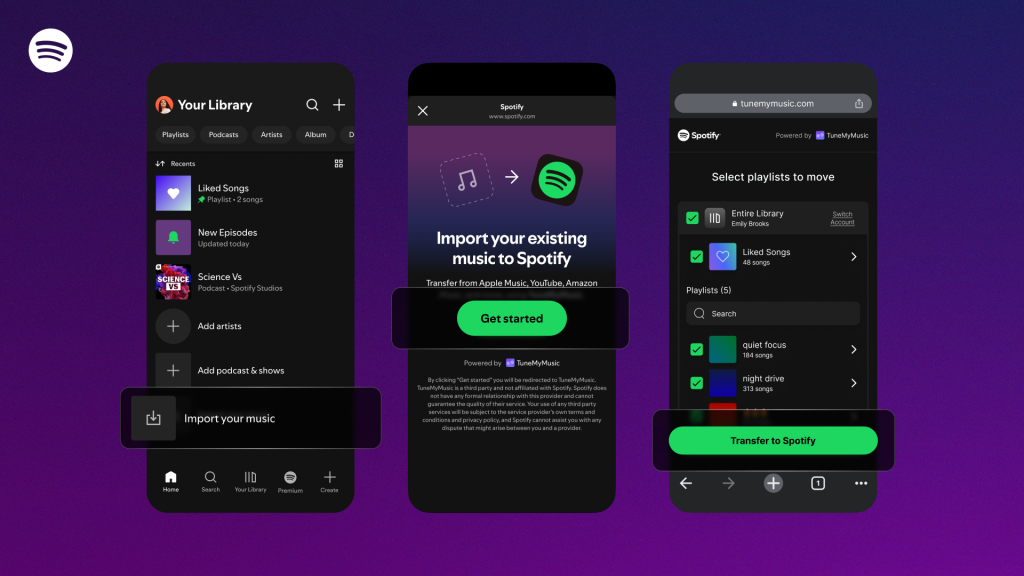
From Your Library, tapping on “Import your music” opens TuneMyMusic in an in-app browser, guiding users through linking multiple accounts and selecting playlists to transfer. This step streamlines switching between music platforms for those who want to keep their curated collections intact.
Alongside this feature, Spotify offers powerful tools for playlist management, including options to edit, organize, collaborate with friends, and add custom cover art. The platform also supports smooth playback transitions, smart filters to organize music by mood or genre, and personalized recommendations that adapt immediately based on imported playlists.
Additional enhancements include sharing capabilities via Spotify Messages, group listening experiences like Blend and Jam for Premium users, and lossless streaming support across thousands of devices.
The TuneMyMusic integration is rolling out globally to Spotify mobile users in the coming days, marking a significant step towards easier migration and ownership of music collections.