







Apple is lowering the barriers to Android with a new wireless data transfer tool in iOS 26.3 Beta 1, making it simpler than ever to jump ship from iPhone to Android. No more cables or headaches—just place your phones side-by-side and go.
How “Transfer to Android” Works
Spotted in the fresh iOS 26.3 Beta (grab it via Settings > General > Software Updates if you’re in Apple’s Beta program), the feature hides under Settings > General > Transfer or Reset iPhone. Tap “Transfer to Android” to kick off a peer-to-peer Wi-Fi and Bluetooth connection—like AirDrop, but cross-platform.
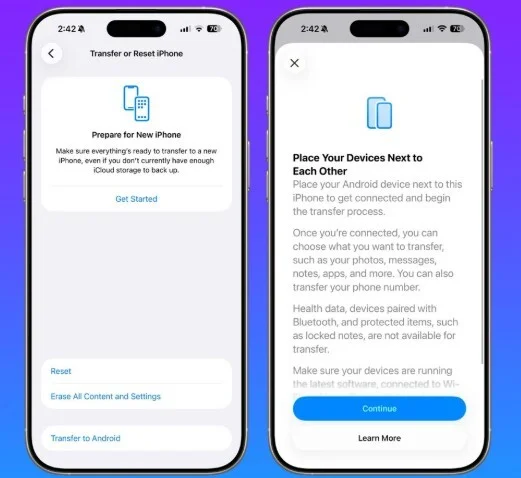
Scan a QR code from your new Android (needs latest software, like Android Canary builds on Pixels), or use a session ID/pairing code. Select what moves over: contacts, messages, photos, notes, apps, and even your phone number. Health data, Bluetooth pairings, and locked notes stay behind for privacy.
This pairs perfectly with Google’s ongoing work on easier iOS-to-Android switches, closing the loop on bidirectional transfers.
Why This Changes Everything
Tired of wired adapters or clunky apps? Until full rollout, stick with Apple’s Switch to Android app (App Store) or Google’s Move to iOS (Play Store) for now. But “Transfer to Android” promises seamless, cable-free magic—giving iPhone loyalists the confidence to try a Galaxy, Pixel, or other Android flagship.
It’s a subtle jab in the platform wars: Apple making exodus less painful, just as Android ramps up iOS imports.
Limited for Now, But Game-Changing Ahead
Beta testers on compatible iPhones can experiment today. Full stable release? No date yet, but expect it ties into broader iOS 26 updates. Android side needs matching software from Google.
Switching platforms? This could be the nudge you’ve needed.